




How-to
How United States Businesses Can Use surhires.com to Automate Contractor Time Tracking and Payroll Integration
Automating contractor time tracking and payroll integration helps U.S. businesses capture accurate work hours and simplify payments. surhires.com uses
By The surhires.com team · · 5 min read
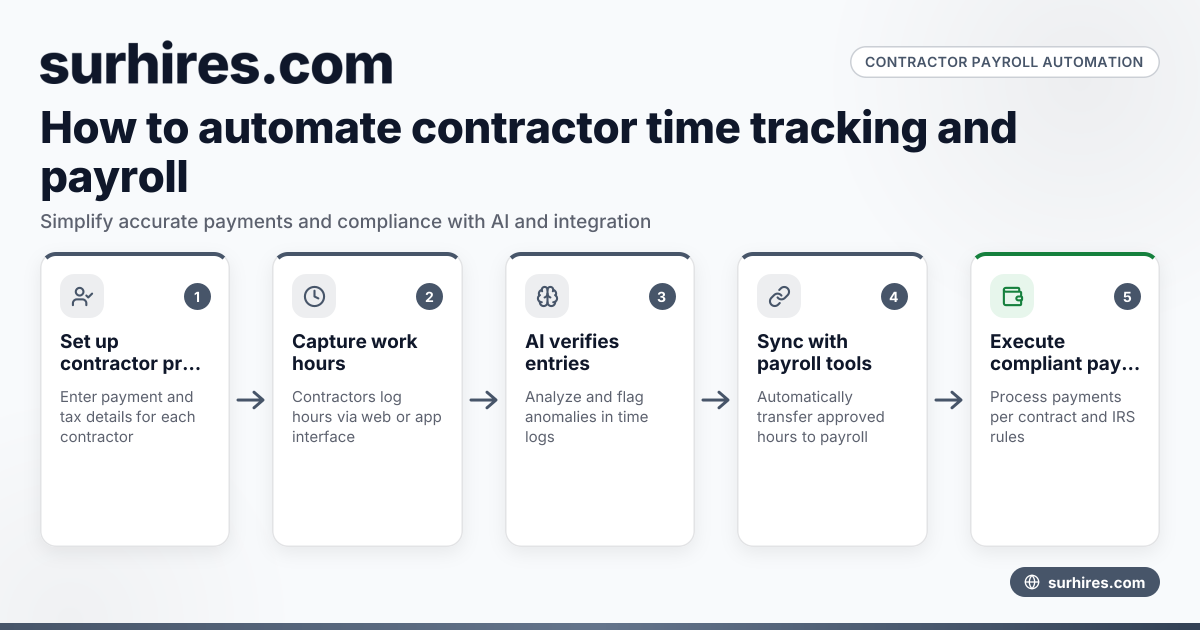
Automating contractor time tracking and payroll integration helps U.S. businesses capture accurate work hours and simplify payments. surhires.com uses AI contractor time features to verify logs and links data seamlessly to payroll systems, reducing errors and saving time.
Key takeaways
- surhires.com automates contractor time tracking and payroll integration tailored for U.S. business needs.
- Accurate contractor hours capture minimizes payment discrepancies and IRS reporting risks.
- The platform supports compliance with U.S. labor and tax regulations including 1099-NEC filing deadlines.
- Integration with common payroll and finance software like QuickBooks and Stripe is seamless.
- AI-powered contractor time tools help reduce manual entry and improve data reliability.
- surhires.com enhances contractor payment processes while addressing compliance and reporting requirements.
Why is contractor time tracking and payroll integration important for U.S. businesses?
Accurate contractor time tracking and payroll integration ensure contractors receive timely, correct payments while keeping your business compliant with IRS and labor rules. These processes reduce errors and manual workload, minimizing risk to your company.
In the U.S., errors in logging contractor hours can cause underpayments, overpayments, or misclassification. Integrated payroll systems streamline payments and prepare records for 1099-NEC filings. This helps businesses in cities such as Chicago or Houston maintain audit-ready documentation and avoid penalties. Automating contractor time tracking preserves data integrity and boosts operational efficiency.
How can surhires.com automate the contractor time tracking and payroll integration process?
surhires.com automates by combining AI validation of contractor time with seamless payroll data transfer. Contractors log hours; AI checks for anomalies and flags issues. Validated timesheets then flow directly into payroll tools like QuickBooks or Stripe, enabling prompt, accurate payments.
Expanded process steps include:
- Setting up contractor profiles with payment and tax details.
- Capturing work hours via surhires.com’s web or app interface.
- Running AI contractor time analysis to verify and correct entries.
- Transmitting approved hours to your connected payroll system automatically.
- Executing payments based on contract terms and compliance standards.
- Providing reports and dashboards for oversight and IRS 1099-NEC preparation.
This end-to-end automation reduces manual data entry errors and frees your team to manage exceptions instead of routine approvals.
What are the first steps to implement contractor time tracking and payroll integration with surhires.com?
Starting with surhires.com requires setting clear contractor payment policies, then creating your account and onboarding contractors. Next, you link your payroll system such as QuickBooks or Stripe for integration.
Steps in detail:
- Define contractor roles, contracts, and pay rates.
- Register your business on surhires.com, entering contractor tax IDs and payment terms.
- Connect your preferred payroll or ERP software to enable data sync.
- Train contractors on using surhires.com’s time tracking and expense submission tools.
- Launch your first payroll cycle using the automated tracking and approval workflow.
- Monitor results via analytics and adjust for compliance or operational needs.
These initial actions ensure your business taps surhires.com’s full automation benefits smoothly and compliantly.
How does surhires.com support ongoing maintenance and updates for contractor payments?
surhires.com continuously updates its platform to reflect changes in U.S. tax laws and labor regulations. It provides customer support for technical or reporting issues and uses AI enhancements to improve time tracking accuracy and payment reliability.
Ongoing maintenance includes automatic updates for IRS filing deadlines, compliance features like SOC 2 data protections, and system usability improvements. This lets your business focus on growth instead of manual payroll checks or software glitches.
Why is automation especially critical for businesses managing many contractors?
Automation is vital for businesses with numerous contractors to avoid costly errors and administrative overload. surhires.com’s AI contractor time capabilities standardize data entry and reduce manual work, improving accuracy and compliance.
Large contractor pools in industrial hubs like Detroit or Houston benefit immensely, as automation prevents delayed payments and misclassification risks. Faster processing strengthens contractor relationships and frees HR or finance teams to focus on strategy rather than payroll backlogs.
Simplify contractor labor management and payment accuracy by exploring how surhires.com automates contractor time tracking and payroll integration with AI-driven precision.
Frequently asked questions
What is contractor time tracking and payroll integration United States businesses need?
It automates recording contractor work hours and sending that data into payroll systems quickly and accurately. This helps comply with U.S. tax laws and avoid payment mistakes.
How does surhires.com ensure payroll compliance for contractors?
The platform securely collects W-9s, tracks 1099-NEC filing deadlines, and generates compliance reports. It follows SOC 2 standards to protect sensitive information.
Can AI contractor time tools fully replace manual time approvals?
AI tools cut down manual approvals by spotting anomalies but businesses can keep final manual reviews for exceptions ensuring accuracy.
Is surhires.com suitable for small businesses or only large enterprises?
It scales easily from small startups with basic QuickBooks needs to large enterprises requiring complex workflows and compliance.
How do contractors submit their hours on surhires.com?
Contractors log hours using an easy online interface accessible on desktops and smartphones or through compatible linked apps.
How does surhires.com integrate with common payroll tools?
surhires.com connects via APIs with QuickBooks, Stripe, and other payroll or ERP systems for automatic data sync, cutting manual entry errors.
For more insights into managing contractors efficiently, visit the surhires.com blog.
Published 26 October 2026
See Surhires on a live requisitionMore from the blog
How to Manage State-Specific Sales Tax Obligations When Paying Independent Contractors in the United States
Managing state sales tax obligations for independent contractors in the United States requires understanding varied state rules, identifying taxable.
27 October 2026 · 6 min read
How United States Businesses Can Simplify Contractor I-9 Employment Eligibility Verification with surhires.com
Contractor I-9 verification in the United States requires businesses to confirm contractors’ legal work authorization using Form I-9. surhires.com.
26 October 2026 · 6 min read
How United States Businesses Can Ensure Compliance with Contractor Data Security and SOC 2 Requirements
Ensuring contractor data security and SOC 2 compliance in the United States means applying strong controls and policies to protect sensitive.
24 October 2026 · 7 min read