




Guides
Multi-State Payroll Compliance for Remote Teams in the United States
Multi-state payroll compliance for remote teams in the United States means paying employees correctly when they live or work in different states. It.
By The surhires.com team · · 12 min read
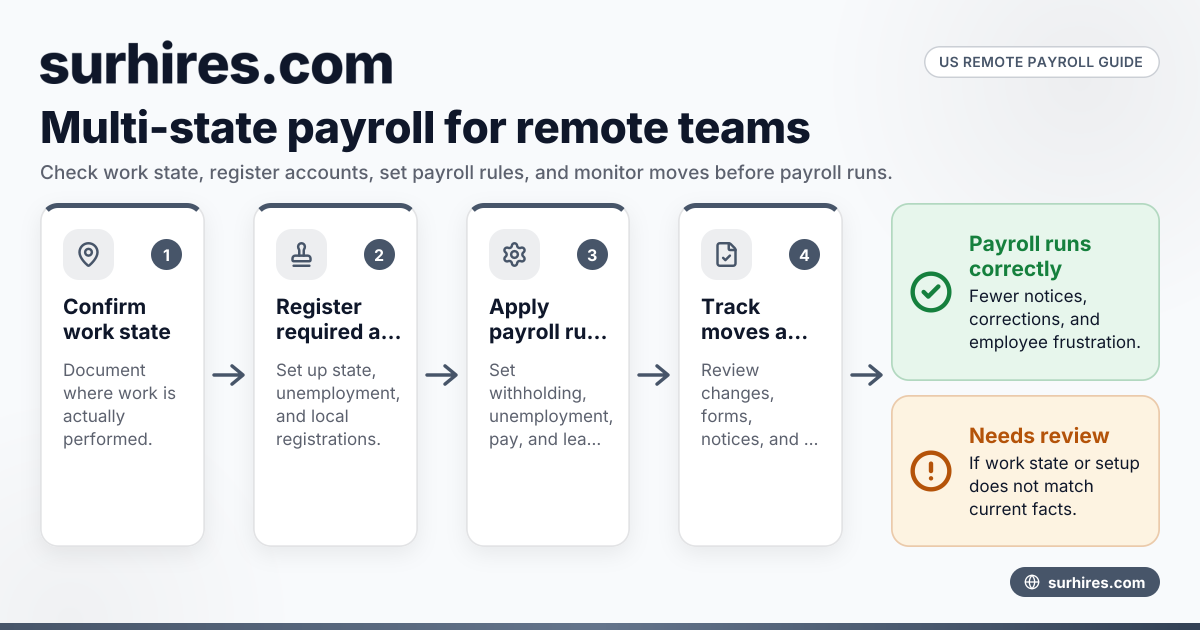
Multi-state payroll compliance for remote teams in the United States means paying employees correctly when they live or work in different states. It usually involves state income tax withholding, unemployment insurance setup, wage and hour compliance, local payroll rules where they apply, and accurate employer registrations before payroll runs.
Key takeaways
- Multi-state payroll compliance starts with knowing where each employee actually works, not just where your company is based.
- You may need state payroll tax accounts, unemployment accounts, and local registrations before the first paycheck.
- Remote employees can trigger wage notice, pay frequency, paid leave, and final paycheck rules in their work state.
- Reciprocal tax agreements, convenience of the employer rules, and local taxes can change withholding decisions.
- Good records matter. Keep employee work locations, tax forms, and payroll setup details current.
- If your team is growing fast, the surhires.com blog has more guides on hiring and compliance in the United States.
What is multi-state payroll compliance for remote employees in the United States?
It is the process of following payroll, tax, and employment rules in every state where your remote employees perform work. That means one Chicago employee, one Houston employee, and one Detroit employee may each require different payroll setup and different compliance checks.
This issue became much more important once remote work spread across state lines. A business can be headquartered in one state and still owe payroll obligations in several others. The biggest mistake is assuming your home-state payroll setup covers everyone. It usually does not.
For most employers, multi-state payroll compliance includes five parts:
- Registering in each required state.
- Withholding and remitting the correct state and local taxes.
- Paying state unemployment insurance in the right state.
- Following state wage and hour laws for remote staff.
- Keeping records up to date when employees move.
These tasks often sit across HR, finance, and legal. Payroll then becomes the point where mistakes show up. If an employee works in the wrong state for payroll purposes, you can create tax notices, amended returns, and employee frustration.
Why is multi-state payroll so hard for remote teams?
Because payroll follows where work happens, and each state can have its own tax, wage, and registration rules. One employee move can change withholding, unemployment, leave compliance, and employer filing requirements at the same time.
The difficulty is not just volume. It is overlap. Federal payroll rules still apply, but states add another layer. Some localities also impose payroll taxes or reporting obligations. If your team works across several states, payroll becomes a location-by-location compliance job.
Here are common reasons companies struggle:
Employee location is often unclear
Some employees work full time from home. Others split time between an office, a customer site, and another residence. Payroll teams need a clear primary work location and a process for location changes.
Taxes and labor rules do not line up perfectly
The state for income tax withholding may not always match the state for unemployment insurance. Wage and hour rules can also differ from tax rules. This means one remote employee may touch multiple compliance workflows.
Moves happen without payroll being told
A sales employee may relocate from Illinois to Texas and assume nothing changes. But payroll, unemployment, state registration, and leave rules may all change. If HR, finance, and the manager do not learn about the move quickly, errors can pile up.
Local rules add complexity
In some areas, local income taxes or local payroll reporting may apply. You need to confirm whether the employee’s city or locality has its own withholding or reporting requirements.
Which state rules apply when an employee works remotely?
Usually, the employee’s work state drives payroll tax and wage compliance, but there are exceptions. You need to review state income tax withholding, unemployment insurance sourcing, local tax rules, and any special state doctrines before deciding payroll treatment.
Start with the basic question: where is the employee performing services? In many cases, that state will matter most for payroll. But not always in the same way for every obligation.
State income tax withholding
If the employee works in a state with income tax, you may need to withhold there. Some employees also live in one state and work in another. In those cases, reciprocal agreements can matter. Where those agreements exist, they can affect which state gets withholding.
You should also watch for special state sourcing rules, including convenience of the employer rules in certain situations. These rules can affect whether wages are treated as earned in a particular state even when the employee works elsewhere.
State unemployment insurance
State unemployment insurance is often assigned under a separate set of tests. The state for unemployment is not always the same as the state for income tax withholding. Payroll teams should avoid assuming these always match.
Wage and hour laws
A remote employee’s state can also determine:
- Minimum wage
- Overtime rules
- Meal and rest break rules
- Timing of paychecks
- Required pay statements
- Final paycheck deadlines
- Paid sick leave and similar mandates
This is why multi-state payroll compliance is more than tax setup. It also affects day-to-day payroll operations and HR policies.
What should you do before hiring a remote employee in another state?
Confirm where the employee will work, register for required payroll accounts, check wage and leave rules, and make sure your payroll system can handle that state before the first day of work.
A clean pre-hire process prevents most multi-state payroll issues. Many payroll problems begin when a company hires quickly and tries to fix compliance later.
1. Confirm the approved work state
Get the employee’s expected work location in writing. Do not rely only on a mailing address. Ask where work will actually be performed.
This matters because payroll is generally tied to work location. A business mailing address or corporate headquarters is not enough.
2. Check whether state registration is required
Before payroll begins, you may need state employer registrations for:
- Income tax withholding
- State unemployment insurance
- Other state employer accounts where required
If the employee works in a locality with payroll obligations, confirm those too.
3. Review wage and leave requirements
Check the basics for that state:
- Pay frequency
- Required wage notices
- Required pay stub details
- Minimum wage
- Overtime standards
- Paid sick leave or paid time off mandates
- Final paycheck timing
This is especially important for small businesses expanding into a second or third state.
4. Confirm workers’ compensation coverage
Workers’ compensation obligations can change when an employee works in another state. Make sure your policy and reporting align with the employee’s work state.
5. Update payroll and HR systems
Your payroll system must support the employee’s state setup, tax withholding, and any local requirements. Your HR team also needs a move-notification process. A simple self-service address update is not enough if the employee is changing work states.
The core payroll compliance checklist for remote teams
A practical checklist helps teams avoid missed steps. The list below works well for a growing employer with remote staff in several states.
Registration and tax setup
- Register for state withholding where required.
- Register for state unemployment accounts where required.
- Confirm local payroll tax obligations if applicable.
- Collect federal and state tax forms from the employee.
- Verify the employee’s work and residence locations.
Payroll operations
- Set the correct work state in payroll.
- Apply the correct withholding setup.
- Apply local taxes where required.
- Set the correct pay frequency.
- Confirm overtime and pay statement rules.
HR and recordkeeping
- Store location approvals and move requests.
- Track state-required notices and acknowledgments.
- Document paid leave eligibility and accrual rules.
- Keep payroll tax account numbers and filing schedules organized.
- Review location data before every payroll cycle.
Offboarding controls
- Confirm the final work state.
- Follow final paycheck deadlines for that state.
- Handle unused paid leave according to state law and company policy.
- Update tax records and separation reporting if required.
Common mistakes in multi state payroll compliance remote employees United States
This search phrase describes a real operational problem: employers with remote staff often miss compliance because they think payroll is centralized. In practice, multi state payroll compliance remote employees United States means each employee location can create separate tax and labor obligations.
Here are the mistakes that cause the most trouble:
Assuming an address change is not a payroll change
A move can trigger new payroll taxes, new leave rules, and a new unemployment review. Treat every move as a compliance event.
Paying before registration is complete
Some employers run payroll first and register later. That can lead to notices, late filings, and corrections.
Missing local tax obligations
State setup is not always the end of the story. Some local jurisdictions have their own payroll requirements.
Ignoring wage statement and final pay rules
Payroll tax may be set up correctly while pay stub content or termination timing is wrong. Employees notice these errors quickly.
Letting managers approve remote work informally
A department head may say yes to an employee move without telling HR or finance. Build a formal approval process so payroll can evaluate the state impact first.
How can AI help with multi-state payroll compliance?
AI can flag employee moves, compare work locations to payroll setup, and surface tasks for registrations or policy review. It helps teams spot issues faster, but it does not replace legal, tax, or payroll judgment.
An ai multi state workflow is most useful when it checks data across HR, payroll, and finance systems. For example, if an employee changes address in HR but payroll still withholds for the old state, AI can flag the mismatch for review.
That said, payroll compliance still needs human oversight. State rules change. Local taxes can be narrow and technical. Unemployment sourcing can be fact-specific. AI is best used as a monitoring and workflow tool, not as the final authority.
Practical use cases include:
- Flagging employee address changes before payroll closes
- Identifying workers in states where you lack tax accounts
- Comparing pay frequency against state requirements
- Prompting reviews when a termination occurs in a different state
- Organizing documents for audits and internal controls
If you use AI in this area, make sure someone on payroll, HR, or legal reviews exceptions before action is taken.
How do you handle an employee who moves to another state?
Pause and verify the new work location, review registration and tax needs, update payroll settings, and check state wage rules before the next payroll closes. Do not assume the old setup still works.
Employee moves are one of the biggest sources of payroll errors. Build a simple response plan so the process is consistent every time.
Step 1: Confirm whether the move is temporary or permanent
A short work trip is different from a permanent relocation. Ask where the employee will regularly perform work and from what date.
Step 2: Review the new state’s payroll impact
Check:
- State withholding needs
- Unemployment insurance setup
- Local tax obligations
- Workers’ compensation impact
- Pay frequency and wage statement rules
- Leave law requirements
Step 3: Update systems before the next payroll run
HR, payroll, benefits, and insurance records should all reflect the approved work state. If one system changes and others do not, errors follow.
Step 4: Communicate with the employee
Tell the employee whether new tax forms or notices are required. Explain that changes in net pay can happen when state withholding changes.
Step 5: Keep documentation
Store the move request, approval date, effective date, and payroll changes. Good records help if state agencies ask questions later.
Do remote contractors create the same payroll issues?
No. Contractors usually do not go through payroll as employees do, but worker classification still matters. If a worker should be treated as an employee, contractor payments can create major tax and compliance risk.
This is where many companies get into trouble. They try to avoid multi-state payroll complexity by paying a remote worker as a contractor. If that classification is wrong, the payroll problem becomes bigger.
For contractors, the main issue is classification and information reporting, not employee payroll withholding. If your team uses both employees and contractors, separate those workflows clearly. You may find these guides useful: Independent Contractor Compliance Guide in the United States and How to Collect Form W-9 From Contractors in the United States.
If you are deciding between hiring models, these may also help: PEO vs Employer of Record in the United States: Which Should Small Businesses Choose?, Employer of Record vs Staffing Agency in the United States: What’s the Difference?, Best Employer of Record Services in the United States for Small Businesses, and Contractor of Record vs Employer of Record in the United States: Which One Does Your Business Need?.
Building a practical compliance process for a small or midsize business
Most companies do not need a perfect enterprise system on day one. They need a repeatable process that catches location changes before payroll mistakes happen.
A practical setup usually includes:
A remote work approval workflow
Do not let employees change states without approval. Require a formal request that routes to HR, payroll, and the manager.
A location source of truth
Choose one system as the official record for work location. Then sync that location to payroll and benefits processes.
A pre-payroll review
Before each payroll run, review:
- New hires
- Terminations
- Employee moves
- State setup exceptions
- Missing tax forms
Clear ownership
Assign responsibility for each area:
- HR owns work location approvals
- Payroll owns tax setup and pay rules
- Finance tracks registrations and filings
- Legal or outside counsel reviews higher-risk state questions
Quarterly audits
At least once each quarter, compare your employee roster to your state payroll accounts. This helps catch silent errors, especially after fast hiring periods.
For example, a growing software firm in Chicago might hire three remote employees across different states in one quarter. A simple quarterly audit can confirm all registrations, withholding setups, and unemployment accounts are active before notices arrive.
When outside help makes sense
Some businesses can manage multi-state payroll internally. Others need outside help once they have employees in several states or frequent employee moves.
You may need support if:
- Your team lacks payroll tax expertise
- Employees move often
- You have workers in states with complex rules
- You are receiving state notices
- HR and payroll systems are not aligned
- Your finance team is spending too much time on manual fixes
The right support depends on your hiring model and internal team structure. The key is to solve the compliance process, not just the next payroll run.
Published 11 October 2026
See Surhires on a live requisitionMore from the blog
How to Manage State-Specific Sales Tax Obligations When Paying Independent Contractors in the United States
Managing state sales tax obligations for independent contractors in the United States requires understanding varied state rules, identifying taxable.
27 October 2026 · 6 min read
How United States Businesses Can Use surhires.com to Automate Contractor Time Tracking and Payroll Integration
Automating contractor time tracking and payroll integration helps U.S. businesses capture accurate work hours and simplify payments. surhires.com uses
26 October 2026 · 5 min read
How United States Businesses Can Simplify Contractor I-9 Employment Eligibility Verification with surhires.com
Contractor I-9 verification in the United States requires businesses to confirm contractors’ legal work authorization using Form I-9. surhires.com.
26 October 2026 · 6 min read