Guides
Remote Hiring Compliance Checklist in the United States
Remote hiring compliance in the United States means making sure your company follows federal, state, and local rules before, during, and after you.
By The surhires.com team · · 12 min read
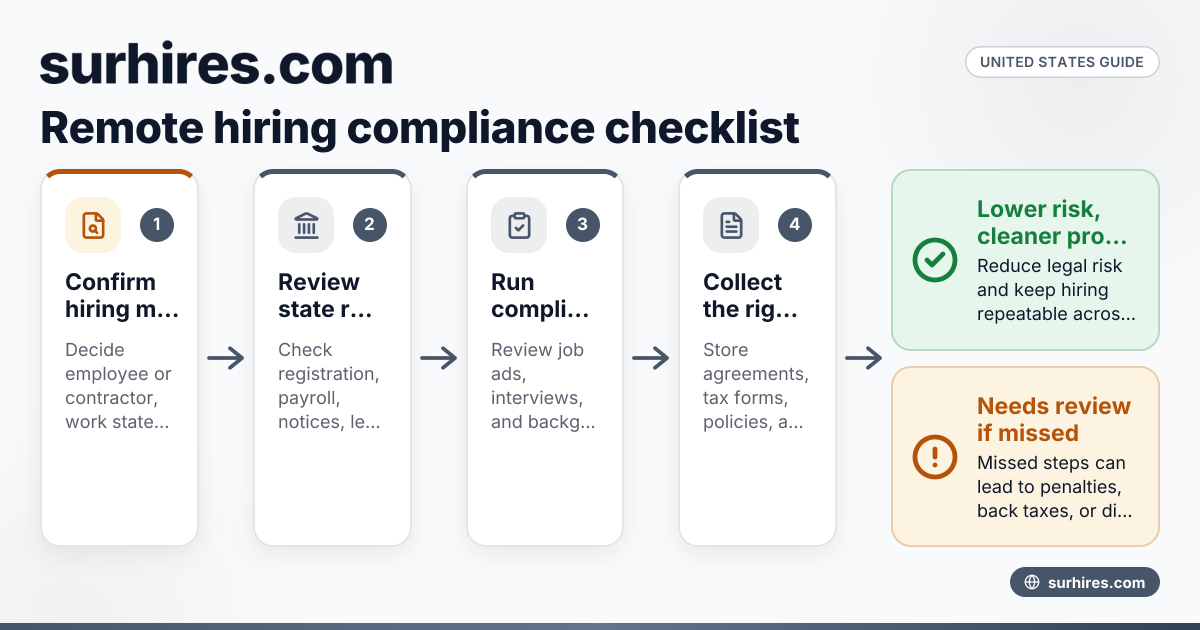
Remote hiring compliance in the United States means making sure your company follows federal, state, and local rules before, during, and after you hire someone who works remotely. A strong checklist helps you reduce legal risk, protect your data, and create a repeatable hiring process that holds up as your team grows.
Key takeaways
- A remote hiring compliance checklist in the United States should cover worker classification, pay rules, tax setup, privacy, and onboarding.
- Compliance starts before the offer letter. Job ads, interviews, and background checks can all create risk.
- Remote hires may trigger state registration, payroll, and notice requirements where the worker lives and works.
- Employee and independent contractor hiring follow different rules and documents. Do not use the same workflow for both.
- Good records matter. Keep signed agreements, tax forms, policy acknowledgments, and pay documents in one place.
- A repeatable process saves time and lowers risk when your business hires across states.
What is a remote hiring compliance checklist in the United States?
A remote hiring compliance checklist in the United States is a step-by-step list of legal and operational checks your business should complete when hiring remote workers. It helps you confirm that the role is properly classified, the worker can legally perform the job, payroll and tax setup are correct, and onboarding documents are complete.
For many businesses, remote hiring feels simple at first. You post a job, interview by video, send an offer, and ship a laptop. The compliance side is where things get complicated.
A worker in Houston may create different tax and labor obligations than a worker in Chicago. A 1099 contractor in Detroit needs a different onboarding path than a W-2 employee. A customer-facing remote rep may also create privacy and outreach compliance issues if they use email and phone as part of the role.
That is why a checklist matters. It turns remote hiring into a process instead of a series of one-off decisions.
Why does remote hiring compliance matter?
It matters because one remote hire can create legal, tax, payroll, and data security obligations in the state where that person works. If you miss those steps, your business may face penalties, back taxes, wage claims, or contract disputes.
Compliance is also a buyer issue. If your company sells to larger customers, they may expect evidence of structured hiring, secure onboarding, and documented controls. In some cases, buyers will ask about your contractor process, background check practices, access control, and security standards such as SOC 2 readiness.
A clean process also helps your finance and operations teams. Payroll runs more smoothly. QuickBooks records stay cleaner. Reimbursements are easier to track. And when leadership asks who signed what, you can answer quickly.
If your team is using tools for ai remote hiring, this becomes even more important. Automation can speed up sourcing and screening, but it does not remove your duty to follow employment, privacy, and recordkeeping rules.
Remote hiring compliance checklist United States: the full process
Use this checklist as a practical framework. Your exact steps may vary by role, state, and whether you hire an employee or contractor.
1. Confirm the hiring model before you recruit
Start by deciding what you are hiring for.
Ask these questions first:
- Is this role an employee or an independent contractor?
- Will the person be full-time, part-time, temporary, or project-based?
- In which state will the person physically perform the work?
- Will they handle customer data, payment data, or regulated information?
- Will they contact prospects by email, text, or phone?
Do not skip classification. Misclassification is one of the biggest remote hiring risks in the United States. If you need a deeper review, see How to Avoid Worker Misclassification When Hiring Remote Talent in the United States.
2. Review state and local hiring requirements
Remote work is not regulated only at the federal level. State and local rules matter too.
Before making an offer, check whether the worker’s location creates obligations such as:
- State employer registration
- State payroll tax withholding
- Unemployment insurance setup
- Workers’ compensation requirements
- Required hiring notices or policy acknowledgments
- Pay transparency or wage notice rules
- Final pay timing rules
- Paid sick leave or leave policy requirements
This is where many small businesses get caught off guard. A company based in one state may hire a remote worker in another state and assume its home-state process is enough. It often is not.
3. Make sure the job posting and interview process are compliant
Compliance begins before a candidate is hired.
Review job ads and interview workflows for these basics:
- Use job-related qualifications only
- Avoid discriminatory language
- Be careful with compensation statements
- Follow any state or local pay transparency requirements
- Ask only lawful, job-relevant interview questions
- Keep records of interview notes and decision criteria
- Use a consistent process across candidates for the same role
If you use ai remote hiring tools for screening or ranking applicants, involve legal and HR early. You should understand what the tool evaluates, how decisions are reviewed, and whether human oversight exists.
4. Handle background checks the right way
Not every role needs a background check. But if you run one, your process should be documented and consistent.
Your checklist should include:
- Decide which roles require checks and why.
- Use a clear written disclosure and authorization process.
- Follow the Fair Credit Reporting Act if a consumer report is used.
- Apply the same standards to similar roles.
- Document adverse action steps if a decision is based on a report.
This area can become risky fast. A casual or inconsistent approach creates problems. Build a policy instead of making case-by-case decisions without records.
What documents should you collect?
Collect the documents needed to support the hiring relationship, tax setup, and security controls. At minimum, gather identity, tax, agreement, and policy records that match the worker type and state.
For employees, common documents include offer letters, tax withholding forms, payroll setup forms, handbook acknowledgments, confidentiality terms, and device or security policies. For contractors, the package usually looks different and should focus on the contract terms, tax forms, and onboarding scope.
Employee documents
For remote employees, your checklist often includes:
- Signed offer letter
- Form I-9 completion and document review
- Federal and state tax withholding forms
- Direct deposit authorization
- Employee handbook acknowledgment
- Confidentiality and acceptable use policies
- Equipment receipt or asset agreement
- Benefits enrollment materials, if applicable
- Emergency contact information
Keep timing in mind. Some forms are completed before day one. Others must be done during onboarding. Store them in a secure system with limited access.
Contractor documents
For remote contractors, collect documents that fit an independent business relationship, not an employment one.
A contractor checklist often includes:
- Signed contractor agreement
- Form W-9
- Scope of work or statement of work
- Rate and payment terms
- Confidentiality and IP terms
- Security requirements based on system access
- Invoicing instructions
If you need help with the legal side, review Contractor Agreement Checklist in the United States and How to Create a Compliant 1099 Contractor Onboarding Process in the United States.
How do you stay compliant across multiple states?
Use one standard core process, then add state-specific checks based on where each remote worker performs services. The core workflow should not change, but tax, payroll, leave, notices, and registration steps often do.
Start with a central checklist that covers every hire. Then create a state review layer for payroll, labor notices, leave rules, and employer registration. This keeps your process consistent without pretending every state works the same way.
Build a core checklist
Your core checklist should cover every remote hire, regardless of location:
- Worker classification review
- Role approval and budget approval
- Job posting review
- Interview process and documentation
- Offer or contract review
- Tax and payroll setup
- Identity and work authorization steps
- Equipment and access provisioning
- Policy acknowledgment
- Security training
- Manager onboarding plan
- Record retention and file storage
This creates consistency. Then you layer in local requirements based on the worker’s location.
Add a state-specific review step
Use a short state review before finalizing the hire. Include:
- Is the company registered as an employer in that state?
- Is payroll configured for that state?
- Are required notices ready?
- Are paid leave policies compliant there?
- Do reimbursement rules apply to remote work expenses?
- Are there wage notice or pay frequency requirements?
This step is especially important when your first remote worker is in a new state.
Employee vs contractor: why the checklist must split early
Many compliance problems begin when businesses use one remote hiring workflow for everyone. That is a mistake.
Employees usually require payroll, tax withholding, wage and hour compliance, benefits review, and work authorization steps. Contractors usually require contract review, Form W-9 collection, invoice processing, and 1099 tracking.
If your business hires both groups, create two separate checklists after the classification decision. Do not use an employee handbook acknowledgment as a substitute for a contractor agreement. Do not put contractors into the same manager controls as employees if that undermines the independent nature of the relationship.
If your team needs a practical starting point, How to Hire 1099 Contractors in the United States explains the contractor path, and What Is a Contractor of Record in the United States? helps when your internal process is not built yet.
What should be in your remote onboarding controls?
Your remote onboarding controls should cover access, equipment, training, policies, and proof of completion. The goal is simple: the worker gets what they need to start, and your business keeps a clear record of what was issued, signed, and approved.
This is where compliance meets operations. A worker who starts without the right payroll setup, policy acknowledgment, or access controls creates avoidable risk on day one.
Security and data access
Remote hires often access systems from home, shared workspaces, or personal networks. Your checklist should include:
- Company email setup
- Multi-factor authentication
- Role-based access permissions
- Device setup and encryption standards
- Password manager access, if used
- Customer data handling rules
- Offboarding plan created in advance
If your business handles payment data through Stripe, customer records in a CRM, or financial records in QuickBooks, access should be limited to what the role needs.
Manager readiness
The hiring manager is part of compliance too. Give managers a standard onboarding plan that includes:
- First-week responsibilities
- Approved communication tools
- Required training
- Performance expectations
- Timekeeping rules for nonexempt employees
- Escalation path for policy issues
Managers create risk when they improvise. A simple written guide helps prevent that.
Common remote hiring compliance mistakes
The most common mistakes are preventable. They usually happen when a growing business moves too fast.
Watch for these issues:
Hiring before checking state setup
A candidate accepts, starts work, and only then someone asks whether payroll can run in that state. By then, you are already behind.
Treating all remote workers the same
Employees, contractors, and temporary project workers should not go through identical processes.
Forgetting record retention
If agreements, forms, and acknowledgments are buried in email, you do not really have a system.
Using tools without governance
This includes applicant tracking, assessment software, and ai remote hiring workflows. Speed is useful, but you still need documented oversight and review.
Giving broad system access on day one
Access should be role-based. Many remote hires receive more data access than they need.
Ignoring offboarding at the hiring stage
Create the offboarding checklist when the hire is created. That makes device return, account shutdown, and access removal easier later.
A simple internal checklist you can adopt
Here is a practical version you can adapt for your business.
Pre-hire
- Confirm employee or contractor classification
- Confirm work state and local requirements
- Review job description and pay range
- Approve budget and hiring manager
- Review interview questions and process
- Determine whether a background check is needed
Offer stage
- Prepare offer letter or contractor agreement
- Confirm compensation or project rate
- Set start date
- Review state notices and payroll setup
- Confirm equipment and software needs
Pre-onboarding
- Collect tax forms and signed documents
- Complete work authorization steps where required
- Add worker to payroll or vendor system
- Create email and system accounts
- Assign security training
- Prepare manager onboarding plan
Day one and beyond
- Confirm policy acknowledgment
- Issue equipment and document receipt
- Limit access by role
- Start timekeeping if needed
- Store all records in one secure location
- Schedule a 30-day compliance review
For contractor onboarding, How to Onboard Remote Contractors in the United States offers a useful companion process. You can also browse the surhires.com blog for related guides.
How often should you review your checklist?
Review your remote hiring compliance checklist at least every quarter and whenever you hire in a new state, change payroll providers, update security controls, or add new recruiting tools.
Quarterly review is a practical minimum for growing teams. Also review after any issue, such as a payroll error, onboarding delay, or contractor dispute. Your checklist should reflect how your business actually hires today, not how it hired two years ago.
A remote hiring compliance checklist in the United States does not need to be complicated. It needs to be clear, repeatable, and tied to the real way your company hires. When you build that process early, growth becomes much easier to manage.
If you want a simpler way to think through compliant contractor hiring and onboarding, learn more about surhires.com.
Frequently asked questions
What is the biggest remote hiring compliance risk in the United States?
For many businesses, the biggest risk is misclassification. If you treat a worker like a contractor when the facts point to employee status, you can create tax, wage, and legal problems. State-specific payroll and labor rules are a close second.
Do remote hires create tax obligations in the worker’s state?
They can. A remote employee working in another state may require employer registration, payroll withholding, and unemployment setup there. Because the rules vary, check the worker’s actual work location before hiring.
Is a contractor checklist different from an employee checklist?
Yes. Employees and contractors require different documents, workflows, and controls. Using one process for both groups can create classification and recordkeeping problems.
Do small businesses need a formal remote hiring checklist?
Yes. Even a small company should have a written process. A short, usable checklist is much better than relying on memory or scattered email threads.
Should we keep remote hiring records in one system?
Yes. Signed agreements, tax forms, policy acknowledgments, and onboarding records should be stored securely in one organized system. That makes audits, disputes, and buyer diligence much easier to manage.
Published 9 October 2026
See Surhires on a live requisitionMore from the blog
Independent Contractor Compliance Guide in the United States
Independent contractor compliance in the United States means setting up the right classification, contract, tax paperwork, payment process, and.
9 October 2026 · 12 min read
How to Create a Compliant 1099 Contractor Onboarding Process in the United States
A compliant 1099 contractor onboarding process in the United States helps you start work quickly without creating tax, labor, or security problems.
9 October 2026 · 12 min read
Contractor Agreement Checklist in the United States
A contractor agreement checklist in the United States is a practical way to make sure your business covers the terms that matter before work starts. A
9 October 2026 · 12 min read